国内常用前端静态资源公共库
转自:https://azpay.cn/post/210.html
BootCDN 是 极兔云 联合 Bootstrap 中文网 共同支持并维护的前端开源项目免费 CDN 服务,致力于为 jQuery、Bootstrap、Vue.js 一样优秀的前端开源项目提供稳定、快速的免费 CDN 加速服务。BootCDN 所收录的开源项目主要同步于 cdnjs 开源项目仓库。
官网:https://www.bootcdn.cn
Staticfile CDN 是由国内优秀的云存储服务商 七牛云 提供存储和加速赞助,技术社区掘金支持。同步国外 cdnjs 源站,同时由国内开源贡献者提交其它有价值的库。
官网:https://www.staticfile.org
360 前端静态资源库是由奇舞团支持并维护的开源项目免费 CDN 服务,支持 HTTPS 和 HTTP/2,囊括上千个前端资源库和 Google 字体库。该站静态资源库数据均同步于 cdnjs 开源项目仓库。
官网:https://cdn.baomitu.com
字节跳动静态资源库支持多协议、资源动态拼接、快速检索及资源的动态更新,安全、稳定、实时。本网站静态资源定期同步自 cdnjs ,有多个文件拼接的功能。
官网:https://cdn.bytedance.com
IIS web.config设置Access-Control-Allow-Origin
来源:https://www.jianshu.com/p/85855a991275
方法一:添加自定义header,缺点是不支持正则,只能设置一个网站,或者*对全部网站开放
<?xml version="1.0" encoding="UTF-8"?>
<configuration>
    <system.webServer>
	<httpProtocol>
	  <customHeaders>
		   <add name="Access-Control-Allow-Origin" value="https://www.domain1.com" />
	  </customHeaders>
	</httpProtocol>
    </system.webServer>
</configuration>
方法二:使用正则,可添加多个,需要安装微软的URL Rewrite组件
<?xml version="1.0" encoding="UTF-8"?>
<configuration>
    <system.webServer>
	<rewrite>
		<outboundRules>
			<rule name="AddCrossDomain">
				<match serverVariable="RESPONSE_Access_Control_Allow_Origin" pattern=".*" />
				<conditions logicalGrouping="MatchAll" trackAllCaptures="true">
					<add input="{HTTP_ORIGIN}" pattern="(https?://((www\.)?domain1\.com|(www\.)?domain2\.cn))" />
				</conditions>
				<action type="Rewrite" value="{C:0}" />
			</rule>
		</outboundRules>
        </rewrite>
    </system.webServer>
</configuration>
汉字拉丁化疑义
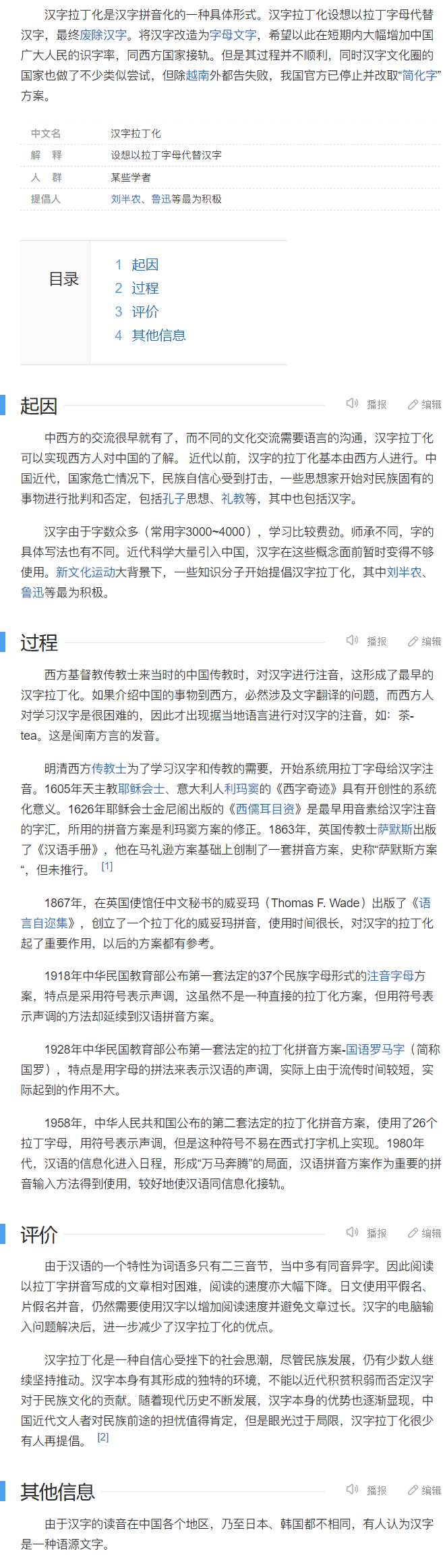
今天在了解五笔输入的时候,偶然得知还有这么一段汉字差点被拉丁化的历史!
光明日报2012年09月16日第11版
https://epaper.gmw.cn/gmrb/html/2012-09/16/nw.D110000gmrb_20120916_5-11.htm
汉字拉丁化
https://baike.baidu.com/item/%E6%B1%89%E5%AD%97%E6%8B%89%E4%B8%81%E5%8C%96/10083888
他是靠五笔阻止了汉字"拉丁化"的英雄,却遭盗版残害终沦为古董
https://baike.baidu.com/tashuo/browse/content?id=feb217783d5c35baa353beb8
汉字也曾误入歧途?论汉字的拉丁化思潮
https://baijiahao.baidu.com/s?id=1710709162619691715
中国汉字三次"拉丁化"风潮及其背后真相
https://zhuanlan.zhihu.com/p/350643993


WINDOWS高级搜索
转自:https://www.cnblogs.com/include/archive/2011/08/23/2150594.html
在 Windows 7 中进行搜索可以简单到只需在搜索框中键入几个字母,但也有一些高级搜索技术以供使用。在搜索文件时,您不一定得了解这些技巧,但这些技巧确实能提供一些帮助,具体取决于搜索的位置和搜索的对象。
提示:
如果知道文件类型,则可以在搜索框中仅输入文件扩展名(例如,"JPG")。若要了解有关 Windows 中基本搜索的详细信息,请参阅查找文件或文件夹。
添加运算符
细化搜索的一种方法是使用运算符 AND、OR 和 NOT。当您使用这些运算符时,需要以全大写字母键入。
运算符
示例
用途
AND
tropical AND island
查找同时包含"tropical"和"island"这两个单词(即使这两个单词位于文件中的不同位置)的文件。如果只进行简单的文本搜索,这种方式与键入"tropical island"所得到的结果相同。
NOT
tropical NOT island
查找包含"tropical"但不包含"island"单词的文件。
OR
tropical OR island
查找包含"tropical"或"island"单词的文件。
添加搜索筛选器
搜索筛选器是 Windows 7 中的一项新功能,通过它可以更轻松地按文件属性(例如,按作者或按文件大小)搜索文件。
在搜索中添加搜索筛选器的步骤
打开要搜索的文件夹、库或驱动器。
单击搜索框,然后单击搜索筛选器(例如,图片库中的"拍摄日期:")。
单击其中一个可用选项。(例如,如果单击了"拍摄日期:",请选择一个日期或日期范围。)
搜索框中"拍摄日期"搜索筛选器的图片"拍摄日期"搜索筛选器
在一次搜索中可添加多个搜索筛选器,甚至也可将搜索筛选器与常规搜索词一起混合使用,以进一步细化搜索。
搜索框中"标记"搜索筛选器菜单的图片可使用两个搜索筛选器搜索很久以前拍摄的标记了"family"的图片。
只有某些特定的搜索筛选器可用,具体取决于搜索的位置。例如,如果在文档库中搜索,您就会发现其中的搜索筛选器与图片库中的不同。您无法指定哪些搜索筛选器可见,但是可更改优化库所针对的文件类型。这样就可以更改在搜索该库时可使用哪些搜索筛选器。若要了解如何执行此操作,请参阅自定义库。
使用关键字细化搜索
如果您希望在单击搜索框时按照没有显示的属性进行筛选,则可以使用特殊关键字。这通常需要键入一个属性名称后加一个冒号,有时加一个运算符,然后键入一个值。关键字不区分大小写。
搜索词示例
用途
System.FileName:~<"notes"
名称以"notes"开头的文件。~< 表示"开头"。
System.FileName:="quarterly report"
名为"quarterly report"的文件。= 表示"完全匹配"。
System.FileName:~="pro"
文件名包含单词"pro"或包含作为其他单词(例如"process"或"procedure")一部分的字符 pro。~= 表示"包含"。
System.Kind:<>picture
不是图片的文件。<> 表示"不是"。
System.DateModified:05/25/2010
在该日期修改的文件。您也可以键入"System.DateModified:2010"以查找在这一年中任何时间更改的文件。
System.Author:~!"herb"
创建者的名字中不含"herb"的文件。~! 表示"不包含"。
System.Keywords:"sunset"
标记了"sunset"一词的文件。
System.Size:<1mb
小于 1 MB 大小的文件。
System.Size:>1mb
大于 1 MB 大小的文件。
注意
可以使用问号 (?) 作为单个字符的通配符,并使用星号 (*) 作为任意数量的字符的通配符。
还可以使用运算符 AND、OR 和 NOT 合并搜索关键字。(注意如何使用括号改变搜索词的效果。)
搜索词示例
用途
System.Author:Charlie AND Herb
创建者为 Charlie 的文件以及文件名或任何文件属性中包括 Herb 的任何文件。
System.Author:Charlie AND System.DateModified:>2009
仅查找 Charlie 在 2009 年以后创建的文件。
System.Author:(Charl* AND Herb)
将 Charles 和 Herb 或 Charlie 和 Herb 列为创建者的文件。
System.Author:"Charlie Herb"
创建者名字与此名字完全相同的文件。
使用自然语言搜索
可启用自然语言搜索以便用更简单的方法执行搜索,这样就无需使用冒号,也不用键入大写的 AND 和 OR。例如,比较这两种搜索:
不使用自然语言
使用自然语言
System.Music.Artist:(Beethoven OR Mozart)
音乐 Beethoven 或 Mozart
System.Kind:document System.Author:(Charlie AND Herb)
文档 Charlie 和 Herb
启用自然语言搜索的步骤
通过依次单击「开始」按钮 「开始」按钮的图片、"控制面板"、"外观和个性化",然后单击"文件夹选项"以打开"文件夹选项"。
单击"搜索"选项卡。
选中"使用自然语言搜索"复选框。
即使已启用自然语言搜索,仍然可以继续用完全相同的方法使用搜索框。您仍然可以根据个人意愿使用运算符或搜索关键字。不同之处在于可使用不那么正式的方法输入搜索条件。下面是一些示例:
电子邮件 今日
文档 2011
创建者 Susan
图片 假日
注意
启用自然语言搜索后,搜索结果可能会比您预期的要多。例如,如果搜索"电子邮件 今日",您将看到今天发送的所有邮件以及内容中包含"今日"的邮件。
加速搜索小技巧
手动加入新的文件类型
当需要搜索索引无法识别的不常用文件类型时,还可以在高级索引选项中添加,以便可以按该文件类型在系统中搜索。在"索引选项"窗口依次点击"高级→文件类型→将新扩展名添加到列表中",手动键入文件扩展名,然后点击"添加",再点击"仅针对属性进行索引"或"针对属性和文件内容进行索引",这样就设置完成了。
使用通配符搜索
通配符是指用来代替一个或多个未知字符的特殊字符,常用的通配符有以下两种:
星号(*):可以代表文件中的任意字符串。
问号(?):可以代表文件中的一个字符。
例如,要搜索所有JPG文件,只需在搜索栏中输入"*.jpg"即可。
使用自然语言搜索
有时,我们可能要搜索的文件需要多条筛选条件,此时就可以利用自然语言搜索功能来一次完成筛选。比如想搜索计算机中的DOC格式或者XLS格式的文件,只需在搜索栏中输入"*.doc or *. xls",那么所有DOC格式和XLS格式的文件都会被搜索出来。
以下是一些常用的关系运算词:
AND:搜索内容中必须包含由AND相连的所有关键词。
OR:搜索内容中包含任意一个含有由OR相连的关键词。
NOT:搜索内容中不能包含指定关键词。
提示:要使用自然语言搜索功能,必须先在"文件夹选项"中"搜索方式"里勾选"使用自然语言搜索",确认后才可以。
保存搜索结果
搜索是一个很耗费时间的过程,尤其是搜索条件很复杂的情况下,所以,有时把搜索结果保存起来是个不错的选择,能节省不少时间和精力。在搜索结果上,点击鼠标右键,选择"保存搜索",或者直接点击工具栏上的"保存搜索"按钮即可。
节约时间,开启预览功能
当搜索器列出了符合要求的所有文件时,你可以利用预览功能预先查看其内容,而不用打开该文件,这样可以节省不少时间。要开启预览功能,只要点击搜索栏下方的"显示预览窗格"按钮即可。
搜索问题Q & A
为什么已建立索引 但文件却依然没有搜索到?
这可能是由该文件夹的安全设置造成的。对于要建立索引的文件夹及其内容,必须将其配置为具有"system"权限。大多数文件已经具有此权限,但是在有些情况下,文件夹可能会缺少"system"权限。文件或文件夹的权限可以在该文件夹"属性"里的"安全"选项卡中修改。
搜索框消失了怎样找回来?
默认情况下,点击Win 7开始菜单中搜索框可以搜索文件或直接执行系统组件。但是有朋友反映,在安装某些软件并重启系统后,开始菜单里的搜索框不见了!
别急,进入控制面板,双击"程序和功能"(查看方式选择"小图标"或"大图标"即可显示出来),在打开的窗口中,点击左上角的"打开或关闭 Windows 功能",然后在打开的"Windows 功能"对话框中勾选"Windows Search"即可。确认后,系统就会显示"正在更改功能"的窗口,随后会弹出对话框,点击"立即重新启动"按钮,系统会开始"配置Windows功能",随后重新启动,在进入系统前,同样会先进行"配置Windows功能",进入系统后,消失的搜索框又回来了!
我能不能索引整个计算机?
不应该执行此操作,这样会使索引变得太大,或者如果包含系统文件位置(如"程序文件"文件夹),则日常搜索将会变慢。为了达到最佳效果,建议仅添加经常搜索的文件夹即可。
我使用的是公用电脑,能否禁用搜索记录?
可以的,如果你用的是Win 7家庭版以上版本,可以利用系统的组策略功能来实现;如果你用的是Win 7家庭版,或者对于组策略还不够熟悉,还可以利用Windows 7优化大师等第三方优化软件来禁用该功能。
利用组策略功能可以在打开组策略管理窗口后依次点击"用户配置→管理模板→Windows组件→Windows资源管理器",然后在右侧窗格中找到"在Windows资源管理器搜索框中关闭最近搜索条目的显示"项目,双击打开"属性"窗口将状态修改为"已启用"即可。
提示:关闭搜索记录后将不会在搜索时显示相应的搜索建议,如果需要清除地址栏中的历史记录,只需在地址栏为按钮的情况下,用鼠标右键单击地址栏,在弹出的快捷菜单中选择"删除历史记录"即可。
点评:Win 7的搜索虽然表现不错,但它的默认设置并不一定适用于每一个用户,因此通过个性化的设置,我们就可以让Win 7的搜索更符合自己的习惯。例如缩小搜索范围、不搜索子目录,就可以有效提升搜索速度;自定义索引目录,就可以让搜索更符合自己的使用习惯,也可以有效提高搜索效率和搜索速度。此外利用一些小技巧,例如结合通配符和多条件搜索等都可以加快Win 7的搜索速度。
linux基础知识
删除文件 rm
rm abc.php
rm /a/b/abc.php
递归删除目录和文件 rm -rf dirname
-r 递归删除
-f 强制删除不提示
删除空目录 rmdir
上传文件到当前目录 rz
下载文件 sz
sz abc.php
sz/a/b/abc.php
修改文件名 mv olename newname
mv a.jpg b.jpg
切换用户 su - username
解压zip文件 unzip
解压abc.zip到目录目录 unzip abc.zip
对单个文件重命名 mv
mv [path/]oldfilename [path/]newfilename
查找文件
$ find <检索路径> <选项> <搜索内容>
按文件名搜索,可以指定完整文件名,也可以使用通配符
find /usr/local -name "abc.jpg"
find /usr/local -name "abc*"
查看文件内容
1 cat - 显示文件内容
2 less - 向前或者向后查看文件内容
3 tail - 查看文件尾部的内容
4 head - 查看文件开头的内容
5 more - 分页显示文件内容
1 cat - 显示文件内容
使用cat命令时,如果文件内容过多,则只会显示最后一屏幕的内容。

cat指令的基本用法:
cat filename 查看名为filename的文件内容;
cat -n filename 查看文件名为filename的文件内容,并从1开始对所有输出的行数(包括空行)进行编号;
cat -b filename 查看名为filename的文件内容,并从1开始对所有的非空行进行编号;

2 less - 向前或者向后查看文件内容
less :查看文件内容时可以向前或向后随意查看内容。

less指令的基本用法;
less filename 查看文件filename的内容;
less -m filename 查看文件filename的内容,并在屏幕底部显示已显示内容的百分比;
上 | 下 : 逐行移动光标位置
空格键: 显示下一屏幕的内容;
回车键: 显示下一行的内容;
U键: 向前滚动半页;
Y键: 向前滚动一行
[pagedown]: 向下翻动一页;
[pageup]: 向上翻动一页;
q: 退出less命令

3 tail - 查看文件尾部的内容
tail:显示文件尾部的内容,默认情况下显示行10行。

tail指令的基本用法:
tail filename: 显示文件filename尾部10行的内容;
tail -n <行数> filename: 显示文件尾部的n行内容;
tail -n 5 filename: 显示文件filename末尾5行内容;
tail -c <字节数> filename: 显示文件尾部的n个字节内容;
tail -c 10 filename: 显示文件filename的末尾10个字节。

4 head - 查看文件开头的内容
head指令用于显示文件开头的内容,默认只显示文件的头10行内容。

head指令的基本用法:
head -n <行数> filename : 显示文件内容的前n行;
head -n 5 file1 : 显示文件file1的前5行内容
head -c <字节> filename : 显示文件内容的前n个字节;
head -c 10 file2 : 显示文件file2的前10个字节内容

5 more - 分页显示文件内容
more:以一页一页的形式显示文件内容,按空白键(space)显示下一页内容,按Enter键会显示下一行内容,按 b 键就会往回(back)一页显示。

基本用法如下:
more file1 : 查看文件file1的文件内容;
more -num file2 : 查看文件file2的内容,一次显示num行;
more +num file3 : 查看文件file3的内容,从第num行开始显示;
————————————————
原文链接:https://blog.csdn.net/m0_67402235/article/details/126434453
----------------------------------------------
以下转自:https://blog.csdn.net/m0_67392931/article/details/123771700
1、把/home目录下面的data目录压缩为data.zip
zip -r data.zip data #压缩data目录
2、把/home目录下面的data.zip解压到databak目录里面
unzip data.zip -d databak
3、把/home目录下面的a文件夹和3.txt压缩成为a123.zip
zip -r a123.zip a 3.txt
4、把/home目录下面的t.zip直接解压到/home目录里面
unzip t.zip
5、把/home目录下面的a1.zip、a2.zip、a3.zip同时解压到/home目录里面
unzip a*.zip
6、把/home目录下面w.zip里面的所有文件解压到第一级目录
unzip -j wt.zip
----------------------------------------------
以下转自:https://blog.csdn.net/weixin_39719989/article/details/116546788
rm是一个用于删除文件和目录的命令行实用程序,这是每个Linux用户都应该熟悉的基本命令之一。在本文中,我们将通过示例和最常见rm选项的说明来解释如何使用rm命令:删除多个文件、删除目录(文件夹)、删除前提示。
使用rm命令的方法
rm(remove)命令的一般语法如下:
rm [OPTIONS]... FILE...
默认情况下,在没有任何选项的情况下执行时,rm不会删除目录,也不会提示用户是否继续删除给定文件。
要删除单个文件,请使用rm命令,后跟文件名作为参数:
$ rm filename
如果你对父目录没有写入权限,则会出现"Operation not permitted"错误。
如果文件没有写保护,它将被删除,恕不另行通知,成功时,该命令不会产生任何输出并返回零。
删除写保护文件时,该命令将提示您进行确认,如下所示:
rm: remove write-protected regular empty file 'filename'?
键入y并按Enter键以删除该文件。
-f选项使rm永远不会提示用户并忽略不存在的文件和参数:
$ rm -f filename
如果要获取有关正在删除的内容的信息,请使用-v(详细)选项:
$ rm -v filename
返回信息:
removed 'filename'
删除多个文件
与unlink命令不同,rm允许你一次删除多个文件,为此,将文件名作为以空格分隔的参数传递:
$ rm filename1 filename2 filename3
你可以使用正则表达式来匹配多个文件,例如,要删除当前目录中的所有.png文件,请输入:
$ rm *.png
在使用正则表达式时,在运行rm命令之前,使用ls命令列出文件,这样你就可以看到哪些文件将被删除。
删除目录(文件夹)
要删除一个或多个空目录,请使用-d选项:
$ rm -d dirname
rm -d在功能上与rmdir命令相同。
要以递归方式删除非空目录及其中的所有文件,请使用-r(递归)选项:
$ rm -r dirname
删除前提示
-i选项使rm在删除之前提示用户输入每个文件:
$ rm -i filename1 filename2
要确认类型y并按Enter键:
rm: remove regular empty file 'filename1'?
rm: remove regular empty file 'filename2'?
删除三个以上的文件或递归删除目录时,要获得整个操作的单个提示,请使用-I选项:
$ rm -i filename1 filename2 filename3 filename4
系统将要求你确认删除所有给定的文件和目录:
rm: remove 4 arguments?
附:rm -rf
如果给定目录或目录中的文件是写保护的,则rm命令将提示你确认操作,要在不提示的情况下删除目录,请使用-f选项:
$ rm -rf dirname
rm -rf命令非常危险,应谨慎使用。
特殊字符\u202E与\u202D
1. \u202E 的作用是使得后续字符串从右至左读(RLO,即RIGHT-TO-LEFT OVERRIDE),如 123\u202EABC 输出后为 123CBA
2. \u202D 的作用是使得后续字符串从左至右左读(LRO,即LEFT-TO-RIGHT OVERRIDE),,如 123\u202DABC 输出后为 123ABC
8237  202D  LEFT-TO-RIGHT OVERRIDE
8238  202E  RIGHT-TO-LEFT OVERRIDE
将一个名为txt.exe 的应用程序,展现出来的名称为exe.txt. 别人会认为这是个文本文件,但点击之后却是一个应用程序。黑客常用这个技巧误导菜鸡点击恶意软件。
参考:
https://juejin.cn/post/6844903683935698952
https://blog.csdn.net/qq_45874536/article/details/120775985
https://www.cnblogs.com/stansec/p/U202E.html
CSS隐藏video控制按钮、进度条
可以通过更改#document片段的CSS来实现这一点,这些是DOM1规范,所有浏览器都支持。
以下解决方案是特定于webkit的
//全屏按钮
video::-webkit-media-controls-fullscreen-button {
    display: none;
}
//播放按钮
video::-webkit-media-controls-play-button {
    display: none;
}
//进度条
video::-webkit-media-controls-timeline {
    display: none;
}
//观看的当前时间
video::-webkit-media-controls-current-time-display{
    display: none;
}
//剩余时间
video::-webkit-media-controls-time-remaining-display {
    display: none;
}
//音量按钮
video::-webkit-media-controls-mute-button {
    display: none;
}
video::-webkit-media-controls-toggle-closed-captions-button {
    display: none;
}
//音量的控制条
video::-webkit-media-controls-volume-slider {
    display: none;
}
//所有控件-通过取消video标签的controls属性更方法
video::-webkit-media-controls-enclosure{
    display: none;
}
扩展资料:TML5相对于之前的标准添加了许多新的语法特征,其中包括video、audio和canvas元素,同时集成了SVG内容。这些元素是为了更容易的在网页中添加和处理多媒体和图片内容。其它新的元素如section、article、header和nav则是为了丰富文档的数据内容。
同时也有一些属性和元素被移除掉,一些元素被重新定义或标准化。同时APIs和DOM已经成为HTML5中的基础部分了。HTML5还定义了处理非法文档的具体细节,使得所有浏览器和客户端程序能够一致地处理语法错误。
HTML5标准规范文档对于如何提高浏览器兼容性和SEO,保持代码结构的整洁性,标签元素的正确嵌套,自定义属性以及字符实体的使用,进行了详细的描述,其中也对HTML5移除的一些元素和属性进行了收集整理以供参考。
MYSQL变量的查看与修改
mysql变量存储位置:
information_schema.GLOBAL_VARIABLES
information_schema.SESSION_VARIABLES
-------------------------------------------
以下来源:https://wenku.baidu.com/view/f1a28bfa5322aaea998fcc22bcd126fff7055d69.html
MySQL的变量分为以下两种:
1)系统变量:配置MySQL服务器的运⾏环境,可以⽤show variables查看
2)状态变量:监控MySQL服务器的运⾏状态,可以⽤show status查看
系统变量系统变量按其作⽤域的不同可以分为以下两种:
1)分为全局(GLOBAL)级:对整个MySQL服务器有效
2)会话(SESSION或LOCAL)级:只影响当前会话
有些变量同时拥有以上两个级别,MySQL将在建⽴连接时⽤全局级变量初始化会话级变量,但⼀旦连接建⽴之后,全局级变量的改变不会影响到会话级变量。
查看系统变量的值
可以通过show vairables语句查看系统变量的值:
[sql]
mysql> show variables like 'log%';
mysql> show variables where Variable_name like 'log%' and value='ON';
注意:show variables优先显⽰会话级变量的值,如果这个值不存在,则显⽰全局级变量的值,当然你也可以加上GLOBAL或SESSION关键字
区别:
[sql]
show global variables;
show session/local variables;
修改系统变量的值:
在MySQL服务器启动后,如果需要修改变量的值,可以通过SET语句:
SET GLOBAL var_name = value;
SET @@GLOBAL.var_name = value;
SET SESSION var_name = value;
SET @@SESSION.var_name = value;
如果在变量名前没有级别限定符,表⽰修改会话级变量。
注意:和启动时不⼀样的是,在运⾏时设置的变量不允许使⽤后缀字母'K'、'M'等,但可以⽤表达式来达到相同的效果,如:
[sql] SET GLOBAL read_buffer_size = 2*1024*1024
这⾥⼀个容易把⼈搞蒙的地⽅是如果查询时使⽤的是show variables的话,会发现设置好像并没有⽣效,这是因为单纯使⽤show variables的话就等同于使⽤的是show session variables,查询的是会话变量,只有使⽤show global variables,查询的才是全局变量。
⽹络上很多⼈都抱怨说他们set global之后使⽤show variables查询没有发现改变,原因就在于混淆了会话变量和全局变量,如果仅仅想修改会话变量的话,可以使⽤类似set wait_timeout=10;或者set session wait_timeout=10;这样的语法。
状态变量
状态变量可以使我们及时了解MySQL服务器的运⾏状况,可以使⽤show status语句查看。
状态变量和相同变量类似,也分为全局级和会话级,show status也⽀持like匹配查询,⽐较⼤的不同是状态变量只能由MySQL服务器本⾝设置和修改,对于⽤户来说是只读的,不可以通过SET语句设置和修改它们。
-------------------------------------------
以下来源:
mysql查看和修改系统参数 http://chn520.cn/article_detail/1646102666592358
mysql 参数
MySQL提供了相当多的系统参数,涉及方方面面。我们可以使用show关键字来查看:
show variables like '%autocommit%';或者show status like '%xxx%';
修改参数值
mysql有一些参数是可以直接修改的,比如mysql的自动提交是默认开启,我们修改为关闭自动提交
set autocommit = 1;
当然也有些系统参数不能直接修改里面的值,当我们修改时会报错,就像这样:
mysql> set @@ft_max_word_len = 1;ERROR 1238 (HY000): Variable 'ft_max_word_len' is a read only variable
所以只能在配置文件中配置,配置参数后必须重启mysql方可生效
- windows版本的mysql配置文件为
my.ini文件 - linux版本的mysql配置文件为
my.cnf文件
[mysql] 参数说明
以下参数需要加到[mysql]下面
| 参数 | 说明 |
|---|---|
| datadir=/xxx/xxx | 数据文件存放目录 |
| socket=/xx/xx/mysql.socket | 本地连接文件,通过localhost来连接mysql需要用到的文件 |
| pid_file | 存储mysql的pid,可通过此id杀死mysql进程 |
| port=3306 | mysql的端口号 |
| default_storage_engine=Innodb | 存储引擎 |
| skip_grant_tables | 使登录时跳过权限检查;登录mysql时,不需要密码就可以登录了:mysql -u root -p |
字符相关
| 参数 | 说明 |
|---|---|
| character_set_client=GBK | 客户端字符集 |
| character_set_connection | 处理客户端发来信息的编码格式 |
| character_set_database | 数据库默认的字符集 |
| character_set_filesystem | 文件系统的编码格式,把操作系统上的文件名转化成此字符集,即把 character_set_client转换character_set_filesystem, 默认binary是不做任何转换的 |
| character_set_results | mysql发送给客户端所用的字符集 |
| character_set_server | mysql server 默认字符集,这个变量建议由系统自己管理,不要人为定义。 |
| character_set_system | 数据库系统使用的编码格式,这个值一直是utf8,不需要设置,它是为存储系统元数据的编码格式。 |
连接相关(connection)
| 参数 | 说明 |
|---|---|
| max_connections | mysql最大连接数,默认151,可通过命令:show processlist查看连接数量,一行就是一个连接 |
| max_user_connections | 限制每个用户的连接个数,默认为0,0表示不限制 |
| back_log | 注意这不是日志,这是用来暂存连接的数量大小,默认是80个,当mysql线程在一个很短时间内得到非常多的连接请求时,就会起作用,连接数量超过 max_connections所设置的值,多出来的连接就会存放到back_log中,当back_log也存不下时,就会拒接掉新的连接; |
| wait_timeout | mysql在关闭一个长连接(非交互式连接)之前需要等待的时长 |
| interactive_timeout | 关闭一个短连接(交互式连接)需要等待的秒数 |
日志相关(log)
| 参数 | 说明 |
|---|---|
| log_error | 指定错误日志文件名称和存放路径,用于记录mysql启动和停止时、以及服务器在运行中出现严重错误时的相关信息 |
| log_bin | 指定二进制日志文件名称和路径,用于记录所有对数据更改的sql语句;默认是关闭的,使用主从复制时,这个开关一定要开启。另外,如果数据丢失了,可通过此文件恢复数据,所以说,建议随时开启这个开关;只要配上路径就会自动打开:log-bin=/bin/mysql.bin |
| binlog_do_db | 指定更新到二进制日志的库,比如我指定binlog_do_db=test,就只会将test库中的数据记录到二进制日志中,其他库都不记录,如果要设置多个库,就得分2行来配置:binlog_do_db=test,binlog_do_db=xx |
| binlog_ignore_db | 指定不记录到二进制日志的库, |
| sync_binlog | 指定多少次写日志后同步磁盘,用户修改数据后,会先将日志存在缓存中,每隔一段时间将缓存中的数据同步到磁盘中进行持久化存储; |
| general_log | 是否开启查询日志记录,默认关闭 |
| general_log_file | 查询日志记录文件存放地址;记录所有的查询语句 |
| slow_query_log | 是否开启慢查询日志记录 |
| slow_query_log_file | 指定慢查询日志文件名称, 用于记录耗时比较长的查询语句 |
| long_query_time | 设置慢查询的时间,超过这个时间的查询语句就会被记录到show_query_log指定的文件中, |
| log_show_admin_statements | 是否将管理语句写入慢查询日志 |
缓存相关(cache)
| 参数 | 说明 |
|---|---|
| key_buffer_size | 索引缓存区大小,只对myisam起作用,默认8M,一般情况下,默认值够用了 |
| query_cache_size | 查询缓存大小,mysql8.0以上版本已被删除<br> show status like '%Qcache%'查看缓存的相关属性<br> Qcache_free_blocks:缓存中相邻内存块的个数,如果值比较大,那么查询缓存中碎片比较多<br> Qcache_free_memory:查询缓存中剩余的内存大小<br> Qcachae_hits:表示有多少次命中缓存<br> Qcache_inserts:表示多少次未命中而插入<br> Qcache_lowmen_prunes:多少条query因为内存不足而被移除出cache<br> Qcache_queries_in_cache:当前cache中缓存的query数量<br> Qcache_total_blocks:当前cache中block的数量 |
| query_cache_limit | 超过此大小将不被缓存 |
| query_cache_min_res_unit | 缓存块最小值 |
| query_cache_type | 缓存类型,决定缓存什么样的查询,默认是关闭的,一共有三个值 <br>0:禁用<br>1:将缓存所有的结果,除非sql中使用sql_no_cache禁用查询缓存<br>2:只缓存select语句中通过sql_cache指定需要缓存的查询 |
| sort_buffer_size | 每个线程需要排序的线程分配该大小的缓冲区 |
| max_allowed_packet=32M | 限制server接收的数据包大小 |
| join_buffer_size=2M | 表示关联缓存的大小,join连表没有索引的时候会使用的缓存 |
| thread_cache_size | 这个和java的线程池很像,就是线程在用完之后不会马上销毁,而是先存起来,下次可以直接使用,省去了开启线程的开销<br>Threads_cached:代表当前此时此刻线程缓存中有多少空闲线程<br>Threads_connected:代表当前已建立连接的数量<br>Threads_created:代表最近一次服务驱启动,已创建线程的数量,如果该值比较大,那么服务器会一直再创建线程;<br>Threads_running:代表当前激活的线程数 |
innodb相关
| 参数 | 说明 |
|---|---|
| innodb_buffer_pool_size | 该参数可以设置指定大小的内存来缓冲数据和索引,最大可以设置为物理内存的80% |
| innodb_flush_log_at_trx_commit | 主要控制innodb将log buffer中的数据写入日志文件并flush磁盘的时间点,值分别为:0,1,2 |
| innodb_thread_concurreney | 设置innodb线程的并发数,设为0表示不限制,如果要设置建议设为cpu核心数一直,或者是cpu核心数的2倍 |
| innodb_log_buffer_size | 此参数确定日志文件所用的内存大小,单位:M |
| innodb_log_file_size | 此参数确定数据日志爱文件的大小,单位:M |
| innodb_log_files_in_group | 以循环方式将日志文件写入到多个文件中 |
| read_buffer_size | mysql读入缓冲区大小,对表进行顺序扫描的请求将分配到一个读入缓冲区 |
| read_md_buffer_size | mysql随机读的缓存区大小 |
| innodb_file_per_table | 此参数确定为每张表分配一个新的文件;默认开启,如果关闭了,创建表之后,将不会产生后缀为.ibd的文件,他的数据会存储到ibdata1这个表空间文件中;最好是一张表一张文件; |
-----------------------------------------------
以下转自:https://blog.csdn.net/weixin_28938171/article/details/113148529
MySQL数据库自带的INFORMATION_SCHEMA,MySQL,TEST三个数据库的用途。
第一个数据库INFORMATION_SCHEMA:
提供了访问数据库元数据的方式。
元数据是关于数据的数据,如数据库名或表名,列的数据类型,或访问权限等。有些时候用于表述该信息的其他术语包括"数据词典"和"系统目录"。
INFORMATION_SCHEMA是信息数据库,其中保存着关于MySQL服务器所维护的所有其他数据库的信息。在INFORMATION_SCHEMA中,有数个只读表。它们实际上是视图,而不是基本表,因此,你将无法看到与之相关的任何文件。
每位MySQL用户均有权访问这些表,但仅限于表中的特定行,在这类行中含有用户具有恰当访问权限的对象。
第二个数据库mysql:
这个是mysql的核心数据库,类似于sql server中的master表,主要负责存储数据库的用户、权限设置、关键字等mysql自己需要使用的控制和管理信息。不可以删除,如果对mysql不是很了解,也不要轻易修改这个数据库里面的表信息。
第三个数据库是test:
这个是安装时候创建的一个测试数据库,和它的名字一样,是一个完全的空数据库,没有任何表,可以删除。
大家在安装或使用MYSQL时,会发现除了自己安装的数据库以外,还有一个 information_schema数据库。information_schema数据库是做什么用的呢,使用WordPress博客的朋友可能会想,是不是安装模板添加的数据库呀?看完本片文章后,你就会对information_schema数据库有所了解。
information_schema数据库是MySQL自带的,它提供了访问数据库元数据的方式。什么是元数据呢?元数据是关于数据的数据,如数据库名或表名,列的数据类型,或访问权限等。有些时候用于表述该信息的其他术语包括"数据词典"和"系统目录"。
在 MySQL中,把 information_schema 看作是一个数据库,确切说是信息数据库。其中保存着关于MySQL服务器所维护的所有其他数据库的信息。如数据库名,数据库的表,表栏的数据类型与访问权限等。在INFORMATION_SCHEMA中,有数个只读表。它们实际上是视图,而不是基本表,因此,你将无法看到与之相关的任何文件。
information_schema数据库表说明:
SCHEMATA表:提供了当前mysql实例中所有数据库的信息。是show databases的结果取之此表。
TABLES表:提供了关于数据库中的表的信息(包括视图)。详细表述了某个表属于哪个schema,表类型,表引擎,创建时间等信息。是show tables from schemaname的结果取之此表。
COLUMNS表:提供了表中的列信息。详细表述了某张表的所有列以及每个列的信息。是show columns from schemaname.tablename的结果取之此表。
STATISTICS表:提供了关于表索引的信息。是show index from schemaname.tablename的结果取之此表。
USER_PRIVILEGES(用户权限)表:给出了关于全程权限的信息。该信息源自mysql.user授权表。是非标准表。
SCHEMA_PRIVILEGES(方案权限)表:给出了关于方案(数据库)权限的信息。该信息来自mysql.db授权表。是非标准表。
TABLE_PRIVILEGES(表权限)表:给出了关于表权限的信息。该信息源自mysql.tables_priv授权表。是非标准表。
COLUMN_PRIVILEGES(列权限)表:给出了关于列权限的信息。该信息源自mysql.columns_priv授权表。是非标准表。
CHARACTER_SETS(字符集)表:提供了mysql实例可用字符集的信息。是SHOW CHARACTER SET结果集取之此表。
COLLATIONS表:提供了关于各字符集的对照信息。
COLLATION_CHARACTER_SET_APPLICABILITY表:指明了可用于校对的字符集。这些列等效于SHOW COLLATION的前两个显示字段。
TABLE_CONSTRAINTS表:描述了存在约束的表。以及表的约束类型。
KEY_COLUMN_USAGE表:描述了具有约束的键列。
ROUTINES表:提供了关于存储子程序(存储程序和函数)的信息。此时,ROUTINES表不包含自定义函数(UDF)。名为"mysql.proc name"的列指明了对应于INFORMATION_SCHEMA.ROUTINES表的mysql.proc表列。
VIEWS表:给出了关于数据库中的视图的信息。需要有show views权限,否则无法查看视图信息。
TRIGGERS表:提供了关于触发程序的信息。必须有super权限才能查看该表。
检查/禁用服务器端口
检查:
服务器本地检查:dos下执行 netstat -na ,可查看所有开启的端口
远程检查:windows检查端口是否关闭,在dos下执行命令 telnet ip地址或域名 端口号 ,如果能进入就说明端口是开放的,如果出现"不能打到开主机的链接,端口xxx失败"就说明端口没有开启。
禁用:
打开“控制面板”→打开“系统和安全”→打开“系统和安全”→打开“windows防火墙”→高级设置→选中“入站规则”→鼠标右点击“新建规则”→选择“端口” →下一步 →特定本地端口 输入要屏蔽的端口,多个用逗号分隔,如:135,139,445 →下一步→点击 “阻止连接”→ 全选域、专用、公用→名称自定,如:禁用端口 → 完成。记得要开启防火墙
如果用的阿里云ECS,除了云服务器ECS》网络与安全》安全组中开启的端口,其他本部默认封闭。
关闭WPS弹窗广告
C:\Users\Administrator\AppData\Local\kingsoft\WPS Office\11.1.0.12358\office6\ksomisc.exe
双击进入高级设置
或者在桌面wps图标上点右键》打开文件所在位置进入目录找到 ksomisc.exe 》双击运行》高级》其他选项》关闭广告弹窗推送,确定